Thursday, January 5, 2012

How to change the boot sequence in Grub2 (Gnome3, Fedora 16 and Ubuntu 11.10/10.00)


The new Gnome3 based Linux distributions (Fedora 16 and Ubuntu 12.04) are now coming with gurub2 boot loader package. The GRUB2 is rather different and a tad bit complex than the legacy GRUB loader. For example among other feature in GRUB2 the boot menu is created by reading multiple scripts present in /etc/grub.d/ directory and the /etc/default/grub file.

To make windows as a default operating system I've compressed the lengthy boot sequence changing procedure into these three simple steps.
  • Login in as root
  • Edit  /etc/default/grub
    Change GRUB_DEFAULT= (sequence number your OS of choice- 1)
    i.e. if windows7 is the 4th option, change the value to 3.

    For example, on my machine to make windows 7 as default OS I changed “GRUB_DEFAULT=saved” to “GRUB_DEFAULT=4

    GRUB_TIMEOUT can also be changed to a lower value, like 1 or 2 seconds to make boot process faster.
  • After changing save the file and run the following script, (exactly as it is) to regenerate the grub boot file with new parameters.
    #grub2-mkconfig -o /boot/grub2/grub.cfg
  • #reboot (Reboot to confirm if it works all right)

Make sure the default menu option is selected correctly, if not count the windows 7 entry and retry the above procedure.

The method has been tested on Fedora-16 + gnome-3. It should also work in Ubuntu/Kubuntu.

If you simply want to update grub2, and you are able to boot into Linux, then you can run the command:
#sudo update-grub
It will rebuild your grub config, finding all the available bootable partitions.

Please comment if you run into issue.

Cheers!

Thursday, August 25, 2011

Example for a threaded code in C++ using Boost (part 1).

My title Nowadays it seems universities only teach Java and students are oblivious to the complex but efficient world of unmanaged programming languages –programming languages which run natively on the hardware and are not dependent on CLR or JVM to run– such as C/C++. Recently I had the honour to tutor two new members in our team about multithreading capabilities of C++. I was not surprised when my students did not know that C++ standard does not include any specifications and built in support for multi-threading (C++ 0x will support natively but that’s more of an adaptation of Boost threads to C++'s standard). Boost is one of the more popular libraries which support threads (concurrent programming).
Since I’ve a strong belief that “doing it yourself is the best way to learn” so without going into the theory of multithreading (that I am sure you can learn elsewhere), I would like to put down steps to use boost library and make your first “threads” in C++.
For this article I am using visual studio 2010 (express), other multiplatform IDE’s such as code::blocks and eclipse for C++ can also be used following similar steps.
The desired output of this exercise is to setup the boost environment, setup a project in visual studio with the boost dependencies and most importantly to make a couple of threads in C++.
  1. Download the latest version of Boot library from http://www.boost.org/users/download/#releases
  2. Install Boost, I have installed it to “C:\boost_1_46_1”, which looks a like figure-1.
  3. Assuming that visual studio 2010 (express) is already installed, make a new Win32 console application and create an empty project. I’ve named my project as simpleBoostThreads.
  4. Now to setup the Boost library’s include paths right click on the project name and click on properties. On the property page click on “Configuration Properties” ->”C/C++” ->”General”. In the additional Include Directories field add the path of the library in my case it is “C:\boost_1_46_1\”. It should look like as in figure-2
  5. The last step in setting up the boost library is to add the library to the linker. To do that go to “Configuration Properties” ->”Linker” ->”General”. In the “Additional Library Directories” field add the path of the library in my case it is “C:\boost_1_46_1\lib”. It should look like as in figure-3
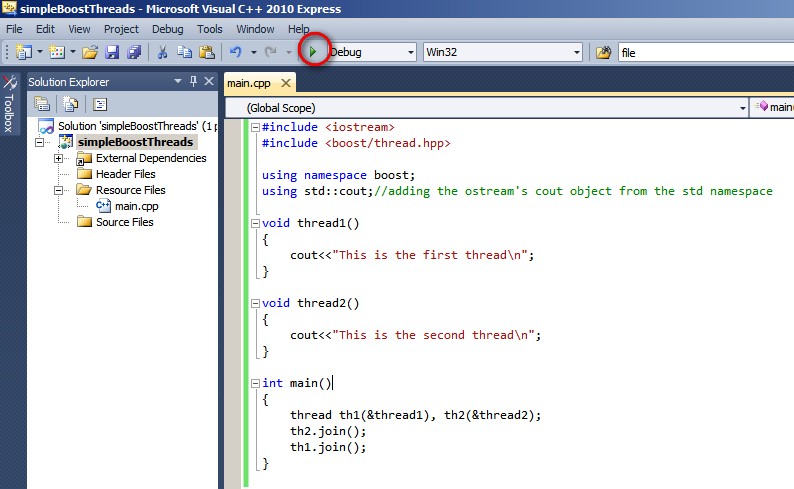
  6. Now add a new file main.cpp file in your project and write the following code snippet. It should look like in figure-4.

  7. #include < iostream >
    #include < boost/thread.hpp >
    using namespace boost;
    using std::cout;//adding the ostream's cout object from the std namespace

    void thread1()
    {
    cout<<"This is the first thread\n";
    }

    void thread2()
    {
    cout<<"This is the second thread\n";
    }

    int main()
    {
    thread th1(&thread1), th2(&thread2);
    th2.join();
    th1.join();
    }
  8. Now execute the program, and voila you have your first thread’s duo.
Download the project (open it up in Visual Studio 2010 and compile, make sure the boost paths are changed according to your PC)
This is my first article about multithreading using Boost library. I am hoping to contribute more by writing about more practical issues while using boost library in real projects.

Wednesday, August 24, 2011

Nook Color a great tablet.

Nook color a great tablet..... It’s cheap but it’s not a dud. Handier than an ipad with 7” screen, it has better pixel density, brighter screen optimized for reading and has generally good build quality. Also, it uses the same processor as an ipad which can be overclocked to 1.2 GHz. But most importantly it’s totally hackable, I have tried gingerbread 2.3.3 and honeycomb 3.0 works perfectly. It even allows dual boot which is good if someone wants to have a go at writing android apps. On the down side it doesn’t have any cameras or 3G only wifi and Bluetooth.

Thursday, January 28, 2010

Apple & McGraw Hill's row

http://gizmodo.com/5458528/apple-punishes-mcgraw+hill-for-msnbc-gaffe

@ McGraw Hill's row with apple, It’s amazing to see how much hype-power Apple has.

Personally, I think iPad is a crap device, without any innovation and real use. But as a marketer Steve Jobs/Apple is genius. Last night the iPad’s launch was literary showing up live on all the news channels…. If nothing else, arrogant stunts like this McGraw Hill one, gives them free pass to millions of $$’s of air time.

As for the tablets and slates… if anyone can create a market for them, its Apple. Let’s see how the sales figures go, it will be interesting.

Wednesday, October 7, 2009

Making firefox browsing faster

To really enhance the browsing speeds in firefox do the following. After this small hack I feel its faster than Chrome, you can do and check for yourself.

1. Type “about:config” into the address bar and press enter (yeah its there!). Scroll down and look for the following entries:

network.http.pipelining
network.http.proxy.pipelining
network.http.pipelining.maxrequests

Normally the browser will make one request to a web page at a time. When you enable pipelining it will make several at once, which really speeds up page loading.

2. Alter the entries by double clicking on them

Set “network.http.pipelining” to “true”
Set “network.http.proxy.pipelining” to “true”
Set “network.http.pipelining.maxrequests” to 30.

This means it will make 30 connection requests at once.


3. Lastly right-click anywhere and select New-> Integer

Copy-paste the variable “nglayout.initialpaint.delay” and set its value to “0″.

This value is the amount of time the browser waits before it acts on information it receives.

voila!!, the firefox is faster now, try opening a really heavy page with images etc. (like yahoo music), you will notice the browsing is much faster now.

Reference: forevergeek.com

Saturday, January 31, 2009

BOOK: The Seven Habits of Highly Effective People

BOOK: The Seven Habits of Highly Effective People
Came across this book, was a good read; relates to many aspects of my life. Recently I have been juggling with a lot of stuff; my PhD, job, long distance relations & every day tasks…. The feeling that since we diluted attentions importance of prioritizing is imperative.

http://www.amazon.com/Habits-Highly-Effective-People/dp/0671708635
-------------
Excerpt from the book
The chapters are dedicated to each of the habits, which are represented by the following imperatives:
  1. Be Proactive! Here, Covey emphasizes the original sense of the term "proactive" as coined by Victor Frankl. You can either be proactive or reactive when it comes to how you respond to certain things. When you are reactive, you blame other people and circumstances for obstacles or problems. Being proactive means taking responsibility for every aspect of your life. Initiative and taking action will then follow. Covey also argues that man is different from other animals in that he has self-consciousness. He has the ability to detach himself and observe his own self; think about his thoughts. He goes on to say how this attribute enables him: It gives him the power not to be affected by his circumstances. Covey talks about stimulus and response. Between stimulus and response, we have the power of free will to choose our response.
  2. Begin with the End In Mind! This chapter is about setting long-term goals based on "true north" principles. Covey recommends formulating a "Personal Mission Statement" to document one's perception of one's own vision in life. He sees visualization as an important tool to develop this. He also deals with organizational vision statements, which he claims to be more effective if developed and supported by all members of an organization rather than prescribed.
  3. Put First Things First! Here, Covey describes a framework for prioritizing work that is aimed at short-term goals, at the expense of tasks that appear not to be urgent, but are in fact very important. Delegation is presented as an important part of time management. Successful delegation, according to Covey, focuses on results and benchmarks that are to be agreed upon in advance, rather than prescribed as detailed work plans.
  4. Think Win/Win describes an attitude whereby mutually beneficial solutions are sought that satisfy the needs of oneself, or, in the case of a conflict, both parties involved.
  5. Seek First to Understand, Then to be Understood. Covey warns that giving out advice before having empathetically understood a person and their situation will likely result in rejection of that advice. Thoroughly reading out your own autobiography will decrease the chance of establishing a working communication.
  6. Synergize describes a way of working in teams. Apply effective problem solving. Apply collaborative decision making. Value differences. Build on divergent strengths. Leverage creative collaboration. Embrace and leverage innovation. It is put forth that when synergy is pursued as a habit, the result of the teamwork will exceed the sum of what each of the members could have achieved on their own. “The whole is greater than the sum of its parts.”
  7. Sharpen the saw focuses on balanced self-satisfaction: Regain what Covey calls "production capability" by engaging in carefully selected recreational activities. Covey also emphasizes the need to sharpen the mind.

Thursday, December 11, 2008


A neat desktop customization for XP & Vista. Sits on the desktop nicely, kind of sticks to the wallpaper, you can right click normally through it & almost none resource usage. Very cool! (100 times better & sleeker than vista native stuff)

http://lifehacker.com/5087956/customize-your-own-killer-enigma-desktop