Monday, June 23, 2014

WebRTC on iOS devices

If you haven't already heard about WebRTC, it is one of the hottest buzz words around town (early 2014). WebRTC is an emerging standard that enables a browser-to-browser voice, video and data sharing without the need of plugins, software or centralized communication infrastructure. It is an innovative technology that finds many applications, ranging from simply sharing a URL to start a video-conference between two browsers to buyers looking at the products in real-time as apposed to static images before they complete the purchase. The WebRTC has the potential to impact businesses including PBX firms, videos firms and web conferencing firms.


Here is my brief summary of WebRTC technology with an emphasis technologies that enable WebRTC on Apple iOS devices.  

Technology Overview

The WebRTC is a communications standard developed by the W3C in close cooperation with the RTCWeb standard developed by the IETF. In practice WebRTC is a set of Libraries/Application Programming interfaces (API) designed to allow Real Time Communication (RTC) using web-browsers without requiring plugins, downloads or installs.  The WebRTC is a part of HTML 5 that offers web application developers the ability to write rich, real-time multimedia applications on the web using simple JavaScript APIs and HTML. 

Background

Google Inc. started WebRTC as a royalty free project. The WebRTC standard solves a common problem for video communication in today’s trends 1). Incompatibilities for real-time communications, with a goal to build a standards-based real time media engine implemented in all of the available browsers, 2).  WebRTC leverages the recent trend in which the web browser is the main “application-runtime”.


Figure 1, WebRTC enabled browsers communicating with different Applications [1].
A WebRTC enabled browser can leverage any signalling system through a web-service that can direct the browser to establish a voice or video RTP connection to another WebRTC enabled device or media server. Once the initial connection is established the WebRTC APIs and the media engine defines and controls the communications path.
To achieve fully immersive video-calling solution WebRTC API standard can be split in to two layers. 

The web application layer

Much of the promise of WebRTC is in the fact that it provides APIs from the browser to the underlying hardware. The web-application developers can communicate with the WebRTC API by calling a set of simplified JavaScript methods. The programming methods are directed to the driver interfaces that provide controls to underlying microphones, and video capture hardware etc.
With WebRTC enabled in a browser (both mobile and desktop), developers can:
·       Capture camera or microphone streams directly from a browser using only JavaScript.
·       Make browser-to-browser calls (audio and/or video).
·       Share data (no server in the middle) to enable peer-to-peer apps (e.g. text chat, gaming, image sharing especially during calls)

The Browser Layer
To implement the code that will allow web browser engines to respond to the JavaScript API calls; A WebRTC stack is also available as a C++ API that allows browsers to capture and hook hardware resource at their disposal.

Figure 2, WebRTC application stack [2]
   

WebRTC support in desktop browsers

·       For the PC, the WebRTC is currently built into the latest Google Chrome version 32.0.0, Opera 18+, Firefox version 27.0, and Internet Explorer using a WebRTC compatible CU-RTC-Web API, a Microsoft implementation of WebRTC like library [3].
·       For Linux based desktops WebRTC is available in the current Chromium version 29.0.0 (beta) Chrome 31.0.0 and Firefox 27.0. 
·       For Apple Mac, the native browser Safari does not support WebRTC. The WebRTC support is available through the latest Google Chrome, Firefox and Opera 18+, but none of the browser’s supports 100% of the WebRTC API functions. A current implementation status WebRTC functions can be viewed in Figure.3. 


Figure 3, current status of WebRTC functions implemented [2][4].

Other than the browser base support on the Mac, there are also few bespoke implementations of WebRTC available for Apple Macs e.g. TenHands, a startup video conferencing company, has embedded their WebRTC capability into FaceTime. The Vidtel is another a cloud based video bridge provider and has already incorporated the WebRTC stack in their Mac SDK. 


1             WebRTC on Mobile Platforms

1.1        Android
Both Google chrome and Mozilla Firefox browsers are fully supported on android platform. Firefox WebRTC support is in its infancy and it has few bugs running a full WebRTC session; such as, issues with echo cancellation, CPU overutilization and video frame occasional out of sync issues [5, 6, 7].

1.2         Apple iOS
Apple iOS is the 2nd most used mobile platform with millions of people using iOS devices. Apple’s take on web browsers for iOS devices is different than other platform. Apple's development agreement makes sure that only iOS’s default browser Safari can be used as a backend engine for any browser running on iOS.  Google Chrome is available for iOS devices but it’s restricted from using the Google’s latest WebKit or Blink rendering engine.  A Google-Chrome running on an iOS device does not use the V8 JavaScript engine and it does not have a multi-process architecture. The iOS limitations make sure that all third-party browsers are built using UIWebView, so they use the same rendering and JavaScript engine. Among other issues such as Safari’s browser engine is slower than the competition it also does not support WebRTC without any apparent roadmap to support it.  
While reviewing the limitations of browsers on iOS it should also be kept in mind that consumption on smartphones especially iOS takes place more using dedicated apps than in the web-browser.
Following are the few vendors that implement WebRTC either as a dedicated app or plugin for WebRTC.

1.2.1      Bowser

Bowser is an experimental implementation of WebRTC on iOS and Android, developed by Ericsson Research [8]. Bowser is not only an App but also a dedicated WebRTC-enabled browser for mobile devices. ‘Bowser’ web browser is based on an Open Source project called the "WebRTC3”, which is being developed within the World Wide Web Consortium and the Internet Engineering Task Force (IETF).

1.2.2      Bistri

Bistri is a simplified one-link solution to enable mobile communication between web browsers by sharing a URL, which can be sent in an email or shared using an IM. Its based on WebRTC technology and it has their service available for web, iOS and Android [9].

1.2.3      TokBox

TokBox provides hosted cloud infrastructure, APIs and pre-configured tools required to deliver enterprise-grade WebRTC capabilities. It does so primarily through its proprietary OpenTok video platform for commercial application. The latest version of OpenTok 2.0 iOS SDK allows OpenTok based WebRTC video sessions in apps built for iPad, iPhone, and iPod touch devices.
Telefonica recently acquired TokBox. The majority of the customer base for TokBox is with vendors who have used their services to add an interactive layer of interface to personalize interaction with their online customers, using just a web-browser [10].

1.2.4      AddLive

AddLive is another simple SDK that can be used to integrate live video, voice and text chat into applications using WebRTC ecosystem. The AddLive SDK support both iOS and Android.

1.2.5      Voxeo

Voxeo Corporation is a telecommunication company that specializes in providing development platforms for unified customer experience (self-service) and unified communications (real time communications) applications. Voxeo has a proprietary SDK for iOS called Phono. The Phono ‘Cordova’ plugin adds the power of Phono [11] to mobile app using the PhoneGap application framework for iOS devices.

1.2.6      Twilio

Twilio Mobile SDK for iOS and Android has used WebRTC to deliver an Internet base telecommunication service. Working on a on a marketing pitch of making any device a phone, they provide local phone numbers with SMS and video/voice call facility in over 17 countries [12].
To provide WebRTC integration Twilio has developed a very stable SDK called Twilio-Cliet. Twilio-Client iOS is an Objective-C library for iOS that enables voice communications with landlines or other Twilio Client devices, including web browsers and other mobile devices.

1.2.7      OpenClove

OpenClove is a mobile tech company that delivers cloud-based mobile and video communication platform. OpenClove online video exchange (OVX)  is the first cloud based video MRF with WebRTC support enabling video in any web or mobile application. OpenClove’s video cloud platform is complete with APIs has not only an SDK for iOS (and Android) [14] but also an established app of their own, called ‘LiveBoard’.

1.2.8      Hookflash

Hookflash is another cloud based voice communication solution. It provides an RTC toolkit that comes with WebRTC enabled SDKs for iOS, Android and now Blackberry 10. It also has an implementation for P2P signaling protocol that allows WebRTC to setup an complete PBX integration without a centralized server [15].

1.2.9      EasyRTC

EasyRTC is the only full-stack open source WebRTC Solution. It comprises of a toolkit suitable for building secure, enterprise WebRTC applications. The SDK provides a bundle of web applications, code snippets, client libraries and server components meticulously written and documented to work right out of box [16].

   References
·       [1] – http://www.tmcnet.com/
·       [2] – www.webrtc.org
·       [3] – CU-RTC-WEB Microsoft flavored implementation of WebRTC http://lists.w3.org/Archives/Public/public-webrtc/2012Oct/att-0076/realtime-media.html
·       [4] - http://iswebrtcreadyyet.com/
·       [9] - https://bistri.com/
·       [11] - http://phono.com
·       [13] - http://easyrtc.com/
·       [15] - http://hookflash.com/
·       [16] - http://www.easyrtc.com

Sunday, April 14, 2013

How to install opencv(cv2) with python bindings in Linux - Ubuntu/Fedora


  1. Install gcc, g++/gcc-c++, cmake (apt-get or yum, in case of yum use gcc-c++)#apt-get install gcc, g++, cmake
  2. Downlaod latest opencv from openCV's website (http://opencv.org/downloads.html).
  3. Untar it #tar - xvf opencv-*
  4. Inside the untarred folder make a new folder called "release" (or any folder name) and run this command in it
    #"cmake -D
    CMAKE_BUILD_TYPE=RELEASE -D CMAKE_INSTALL_PREFIX=/usr/local -D BUILD_PYTHON_SUPPORT=ON -D BUILD_EXAMPLES=ON .."


    the ".." will pull files from the parents folder and will get the system ready for installation for your specific platform.
  5. in the release folder  (#cd release) run #make
  6. After about 3-4 mins (obviously could be faster on your machine) of make processing when its finished run #make install
That's it, now go to python and try ">>> import cv2" you should not get any error message.
I've tested it on python 2.7, should be virtually similar to python 3.x.

Friday, January 4, 2013

Microsoft Office works flawlessly in Linux

Microsoft Office 2007 on Linux (Ubuntu 12.10 and Fedora)
Microsoft Office 2007 on Linux (Ubuntu 12.10 and Fedora 17)


Thanks to PlayOnLinux all Microsoft office products including Office 2007 and Office 2010 work flawlessly on Linux desktops. I tested my -purchased- version of Office 2007 on Fedora 17 and Ubuntu 12.10. Finally I can delete Windows (especially after the Windows 8 Metro confusion) and keep my laptop fast and efficient with couple of Linux Flavours.

The PlayOnLinux is based on Wine. But don’t fret, it's a much refined version compared to the manual hacks and cracks that use of Wine brings to mind. During the installation the software automatically downloads all the libraries and dll’s that Microsoft products require. The downloads are on the fly from their pre-set repositories. The process is surprisingly totally seamless and in no time your Office products will pop-up in the Ubuntu Unity Launch bar.

They also promise that all the Windows based games are playable in Linux. I still need to try my Mass Effect 3 DVD, if it manages to pull our decent FPS, then Hallelujah!

NOTE: If you like the product PlayOnLinux please consider donating to the developers, they have done an awesome job.


Thursday, January 5, 2012

How to change the boot sequence in Grub2 (Gnome3, Fedora 16 and Ubuntu 11.10/10.00)


The new Gnome3 based Linux distributions (Fedora 16 and Ubuntu 12.04) are now coming with gurub2 boot loader package. The GRUB2 is rather different and a tad bit complex than the legacy GRUB loader. For example among other feature in GRUB2 the boot menu is created by reading multiple scripts present in /etc/grub.d/ directory and the /etc/default/grub file.

To make windows as a default operating system I've compressed the lengthy boot sequence changing procedure into these three simple steps.
  • Login in as root
  • Edit  /etc/default/grub
    Change GRUB_DEFAULT= (sequence number your OS of choice- 1)
    i.e. if windows7 is the 4th option, change the value to 3.

    For example, on my machine to make windows 7 as default OS I changed “GRUB_DEFAULT=saved” to “GRUB_DEFAULT=4

    GRUB_TIMEOUT can also be changed to a lower value, like 1 or 2 seconds to make boot process faster.
  • After changing save the file and run the following script, (exactly as it is) to regenerate the grub boot file with new parameters.
    #grub2-mkconfig -o /boot/grub2/grub.cfg
  • #reboot (Reboot to confirm if it works all right)

Make sure the default menu option is selected correctly, if not count the windows 7 entry and retry the above procedure.

The method has been tested on Fedora-16 + gnome-3. It should also work in Ubuntu/Kubuntu.

If you simply want to update grub2, and you are able to boot into Linux, then you can run the command:
#sudo update-grub
It will rebuild your grub config, finding all the available bootable partitions.

Please comment if you run into issue.

Cheers!

Thursday, August 25, 2011

Example for a threaded code in C++ using Boost (part 1).

My title Nowadays it seems universities only teach Java and students are oblivious to the complex but efficient world of unmanaged programming languages –programming languages which run natively on the hardware and are not dependent on CLR or JVM to run– such as C/C++. Recently I had the honour to tutor two new members in our team about multithreading capabilities of C++. I was not surprised when my students did not know that C++ standard does not include any specifications and built in support for multi-threading (C++ 0x will support natively but that’s more of an adaptation of Boost threads to C++'s standard). Boost is one of the more popular libraries which support threads (concurrent programming).
Since I’ve a strong belief that “doing it yourself is the best way to learn” so without going into the theory of multithreading (that I am sure you can learn elsewhere), I would like to put down steps to use boost library and make your first “threads” in C++.
For this article I am using visual studio 2010 (express), other multiplatform IDE’s such as code::blocks and eclipse for C++ can also be used following similar steps.
The desired output of this exercise is to setup the boost environment, setup a project in visual studio with the boost dependencies and most importantly to make a couple of threads in C++.
  1. Download the latest version of Boot library from http://www.boost.org/users/download/#releases
  2. Install Boost, I have installed it to “C:\boost_1_46_1”, which looks a like figure-1.
  3. Assuming that visual studio 2010 (express) is already installed, make a new Win32 console application and create an empty project. I’ve named my project as simpleBoostThreads.
  4. Now to setup the Boost library’s include paths right click on the project name and click on properties. On the property page click on “Configuration Properties” ->”C/C++” ->”General”. In the additional Include Directories field add the path of the library in my case it is “C:\boost_1_46_1\”. It should look like as in figure-2
  5. The last step in setting up the boost library is to add the library to the linker. To do that go to “Configuration Properties” ->”Linker” ->”General”. In the “Additional Library Directories” field add the path of the library in my case it is “C:\boost_1_46_1\lib”. It should look like as in figure-3
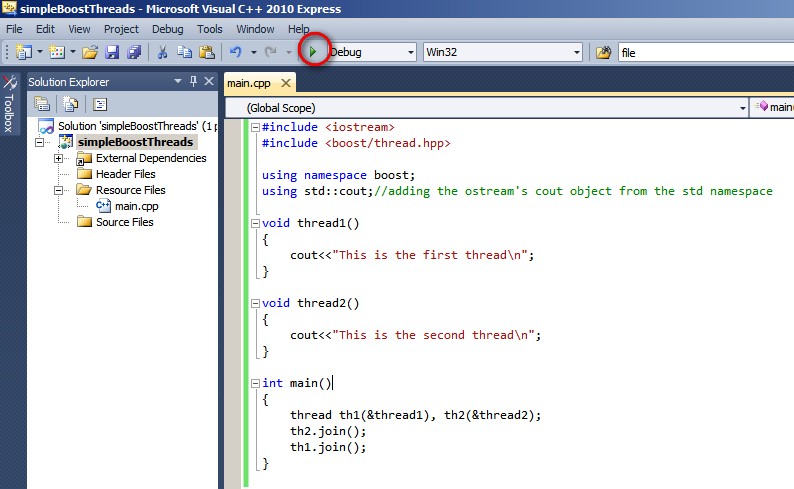
  6. Now add a new file main.cpp file in your project and write the following code snippet. It should look like in figure-4.

  7. #include < iostream >
    #include < boost/thread.hpp >
    using namespace boost;
    using std::cout;//adding the ostream's cout object from the std namespace

    void thread1()
    {
    cout<<"This is the first thread\n";
    }

    void thread2()
    {
    cout<<"This is the second thread\n";
    }

    int main()
    {
    thread th1(&thread1), th2(&thread2);
    th2.join();
    th1.join();
    }
  8. Now execute the program, and voila you have your first thread’s duo.
Download the project (open it up in Visual Studio 2010 and compile, make sure the boost paths are changed according to your PC)
This is my first article about multithreading using Boost library. I am hoping to contribute more by writing about more practical issues while using boost library in real projects.

Wednesday, August 24, 2011

Nook Color a great tablet.

Nook color a great tablet..... It’s cheap but it’s not a dud. Handier than an ipad with 7” screen, it has better pixel density, brighter screen optimized for reading and has generally good build quality. Also, it uses the same processor as an ipad which can be overclocked to 1.2 GHz. But most importantly it’s totally hackable, I have tried gingerbread 2.3.3 and honeycomb 3.0 works perfectly. It even allows dual boot which is good if someone wants to have a go at writing android apps. On the down side it doesn’t have any cameras or 3G only wifi and Bluetooth.

Thursday, January 28, 2010

Apple & McGraw Hill's row

http://gizmodo.com/5458528/apple-punishes-mcgraw+hill-for-msnbc-gaffe

@ McGraw Hill's row with apple, It’s amazing to see how much hype-power Apple has.

Personally, I think iPad is a crap device, without any innovation and real use. But as a marketer Steve Jobs/Apple is genius. Last night the iPad’s launch was literary showing up live on all the news channels…. If nothing else, arrogant stunts like this McGraw Hill one, gives them free pass to millions of $$’s of air time.

As for the tablets and slates… if anyone can create a market for them, its Apple. Let’s see how the sales figures go, it will be interesting.